About CookBookly
CookBookly — Your Smart Recipe Companion
CookBookly is a beautifully designed recipe app that helps you organise, plan, and cook with ease. Whether you’re meal prepping for the week, collecting family favourites, or exploring new cuisines, CookBookly keeps everything simple and stress-free.
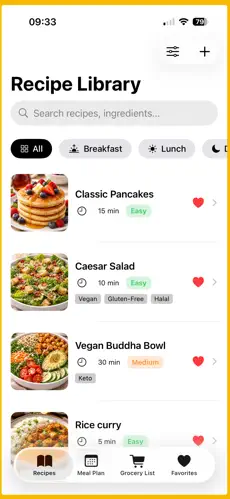
🧾 Your Personal Recipe Library
Keep all your recipes organised in one place with clear categories:
• Breakfast
• Lunch
• Dinner
• Snacks
• Desserts
Smart filters help you find exactly what you need:
• Cook time: 15 min, 30 min, 45 min, 60+ min
• Dietary preferences: Vegan, Keto, Halal, Gluten-Free
• Difficulty: Easy, Medium, Hard
• All recipes are saved locally for full offline access
🍽️ Step-by-Step Cooking Mode
Cook with confidence, hands-free:
• Full-screen cooking mode with one step at a time
• Built-in timers for individual steps
• Screen stays awake while cooking
• Large, clear text designed for kitchen use
• Swipe easily between steps
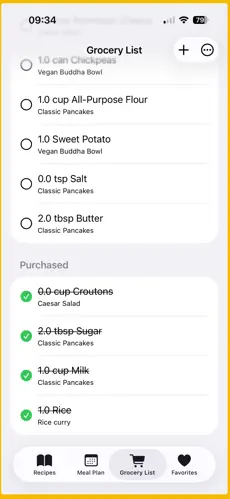
🛒 Smart Grocery Lists
Shopping made effortless:
• Automatically generate grocery lists from recipes
• Combine ingredients from multiple meals
• Tick items off as you shop
• Works fully offline
• See which recipes use each ingredient
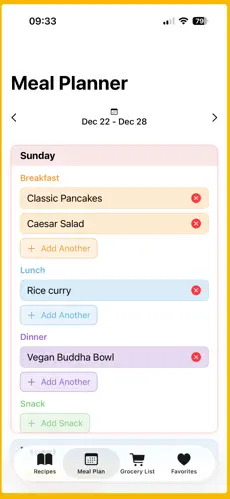
📅 Weekly Meal Planner
Plan your meals in seconds:
• Drag and drop meals into each day
• Colour-coded by day and meal type
• Generate a full weekly grocery list automatically
• Reuse previous meal plans
• Jump to any week with the calendar picker
🔍 Powerful Recipe Search
Find recipes instantly:
• Search by ingredient (e.g. chicken, rice)
• Search by recipe name
• Search by cuisine type
• Partial matches supported
• Searches across all recipe details
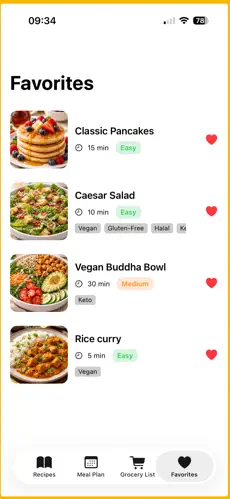
❤️ Favourites & Custom Recipes
Create your own digital cookbook:
• Save favourite recipes with one tap
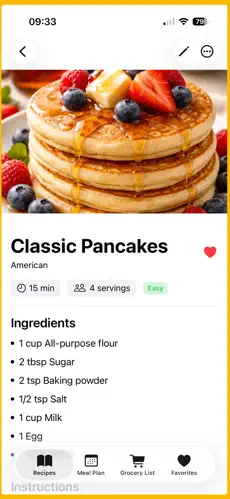
• Add your own recipes including:
Ingredients with amounts and units
Step-by-step instructions
Optional timers per step
Recipe photos
Personal notes
• Edit and customise recipes anytime
🎨 Designed for Everyday Cooking
• Minimal, modern interface
• Large food images and readable text
• Warm cream tones with olive-green accents
• Light and dark mode support
• Colour-coded planner for quick navigation
💎 Premium Upgrade
Unlock more with a one-time purchase:
• Unlimited recipes (free version includes 5)
• Unlimited meal plans
• Advanced recipe features
• Cloud sync across devices
• Priority support
👩🍳 Perfect For
• Meal-prep lovers
• Busy families planning weekly meals
• Home cooks building a recipe collection
• Anyone who wants to cook smarter and faster
Your data stays private and stored on your device. No account required. Fully offline.
Start cooking with clarity and confidence using CookBookly.
Screenshots